TARS Timeclock Guide for Employees
Time & Attendance Reporting System (TARS) Timeclock Guide for Employee Time Reporters
UCR's Time & Attendance Reporting System (TARS) is UCR's online tool that automates time and attendance reporting. This system offers users the automation of the labor-intensive process of recording payroll information into the Personnel Payroll System (PPS). In addition, TARS increases the transparency of the time reporting process.
The TARS system timeclock feature is used by School of Medicine UCR Health medical clinics for non-exempt hourly paid employees. Other than the timeclock feature, existing TARS guidelines apply.
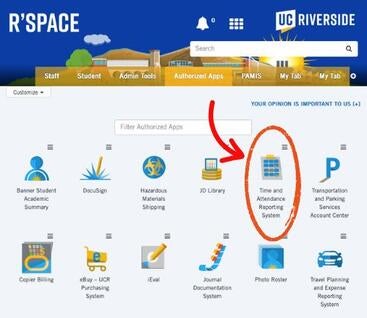
Access the Time & Attendance Reporting System (TARS) here or through the Rspace portal (pictured at right).
Specific Timeclock Procedures
- Timeclock employees do not record time-in/time out by day on their timesheet as the system automatically enters these hours on their timesheet based upon the clock-in / clock-out selection. On a daily basis, employees will be required to log into any of the computers at the clinics to:
- Clock in for their specific scheduled shift start time.
- Clock out for their meal break.
- Clock in when return from meal break.
- Clock out at the end of scheduled shift time.
- Employees may clock in to record time five minutes before their scheduled shift.
- Overtime or compensatory time must be reported in the same pay period that it is earned, and must be pre-approved.
- TARS will automatically calculate weekly overtime.
- TARS does not record or process FMLA.
- Recording Vacation/Sick and Compensatory Time Off.
- Sick Leave/ Vacation/Compensatory leave hours must be added by the Supervisor or Time and Attendance Administrator (TAA).
- Use the comments to record details regarding hours worked or leave taken.
- Use the attachments option to upload supporting documents (e.g, jury notice).
- If an employee forgets to clock in/out the supervisor can edit clock-in/out times. If an employee does not clock-out for more than 12 hours an alert is sent to the supervisor.
- Employees “certify” their hours entered in TARS are correct by clicking “submit to supervisor.” If adjustments are required to the timesheet, the adjustment should be completed as soon as possible prior to the payroll submission date. If the adjustment is discovered after the payroll submission date, the time record will be adjusted the following pay period.
- Employees or supervisors who falsely under-report or over-report hours worked for themselves or others for which they are approving time in TARS may be subject to discipline up to and including termination. Employees may not share passwords or allow others to use their password to record their hours worked.
If your timesheet is not submitted by the cutoff date (Tuesday at 11:30 pm, following the end of the time reporting period) it will auto-submit to your supervisor. If changes are made to your timesheet by your supervisor or payroll staff you will receive an email notification.